
 Join our Discord
📜 Hitomi Companies 💼
VIDEO : https://youtu.be/4nUq_bfltwk
This script represents a complete economic and social management solution for RedM servers.
Designed to offer total autonomy to administrators and advanced management for players, it redefines interaction between jobs, banking, and institutions. 🚀
----
I. 🛠️ THE ADMINISTRATION INTERFACE (REAL-TIME CREATION)
The script administration is done entirely in-game, allowing the creation of a dynamic economy without ever having to touch configuration files or restart the server. ⚡
-----------------------------------------------
🏢 Complete Company Creation
Each company is defined by seven specific parameters:
🆔 Unique Identifier (ID): Defines the technical name for the job system (setjob).
🏷️ Label: The public name of the company as it will appear to players.
📍 Zone of Influence: Allows the company to be sectorized so it is attached to a specific town hall or government.
🗺️ Visual (Blip): Choice of the map icon.
📢 Public Recruitment: A toggle (True/False) to allow town halls to offer this job.
📌 Blip Coordinates: Exact location of the icon on the map.
🚪 Prompt Coordinates: Location of the physical interaction point to open the menu.
----
📈 Hierarchical Architecture (Grades)
The grade system is flexible and editable on the fly:
🔢 Automatic Numbering: The script automatically manages rank order (+1/1 when adding or removing).
📛 Grade Label: Custom name (e.g., Apprentice, Artisan, Boss).
💵 Salary: Fixed amount paid each pay cycle.
🪙 Commission: Percentage of profit paid to the employee/company during sales to vendors.
🔑 Permissions: Checkbox system to define access rights to each tab.
----
🌲 Creation of Harvesting Zones
For manual jobs, configure live resource points:
📛 Zone Name: Resource identification.
🕹️ Interaction Type: Choice between an invisible point or a physical object (Prop) placed in the world.
📦 Object Model: If the type is “Prop”, choice of the 3D model to display.
⏳ Regeneration: Resource respawn time after harvesting.
📍 Multi-positions: Ability to add multiple locations for the same zone.
🎬 Animations: Choice of animation (with or without an object in hand) and action duration.
----
🧪 Processing Locations
Transform raw materials into finished products:
📍 Name and Location: Identification of the location and placement of the interaction point.
🍳 Crafting Recipe: Definition of the source item (quantity) and the final item (quantity).
⏱️ Processing Time: Time required to perform the transformation.
----
🏪 Vendor System (NPC)
👤 Identity: Merchant name.
📍 Location: Sales prompt location.
💲 Dynamic Pricing: Ability to set a fixed price or a price range (min/max) for a random aspect.
-----------------------------------------------
II. 💼 THE COMPANY MENU (THE 5 PILLARS)
A structured interface for total immersion for employees and bosses.
----
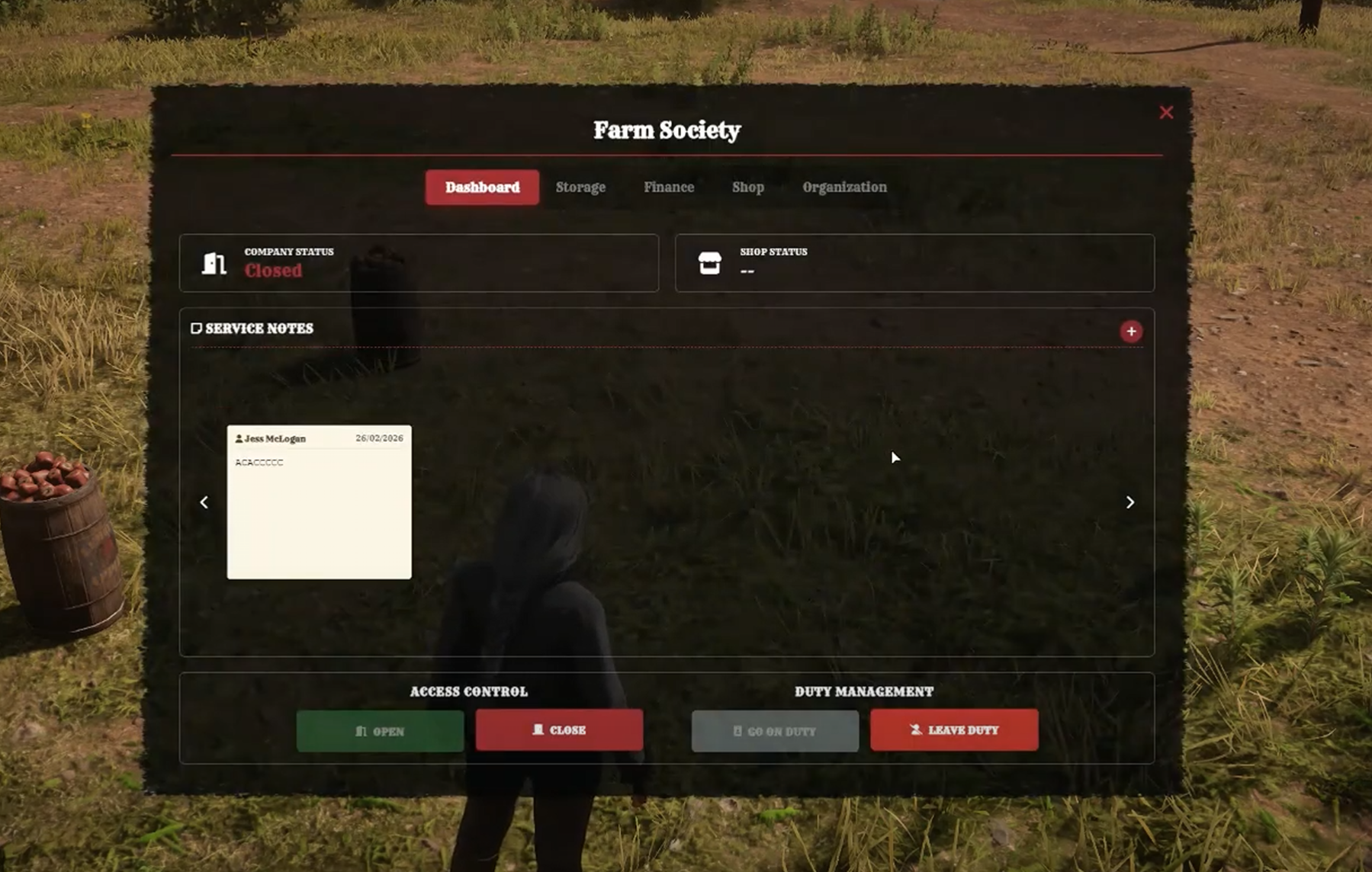
📊 DASHBOARD
The immediate control center of the company.
🚦 Opening Status: Three available modes (Open, Shop Only, Closed).
🎨 Dynamic Blips: The icon changes color on the map (Green = Open, Red = Closed, Blue = Shop Only).
🕒 Duty Management: “Start Duty” and “End Duty” buttons.
📝 Service Notes: Internal communication system (read, publish, edit, delete) with author and date.
----
📦 STORAGE
Manages the logistical and material aspect.
🔓 Stash Access: Opening of a physical inventory chest.
🏋️ Upgrade: Pay to increase storage capacity (in kg).
📑 Storage Logs: Ultra-detailed history (Name, item, quantity, time) for each movement.
----
💰 FINANCE (Treasury)
The accounting aspect of the company.
💵 Live Balance: Display of available cash in the register.
🏧 Fund Movements: Cash deposit and withdrawal functions.
📑 Financial History: Record of all transactions (sales, salaries, withdrawals).
----
🛒 SHOP (The Store)
Turn the company into a shop for citizens.
🛠️ Setup: Creation of the point of sale and shop name.
🏷️ Shelf Management: Put items from the stash up for sale via the shop UI (Stash and shop linked!), set/modify prices, or remove items.
📈 Expansion: Pay to unlock more sale slots in the shop.
🌍 Visibility: Enable or disable public access to the shop.
----
👥 ORGANIZATION (Human Resources)
The ultimate tool for team management.
🖱️ Drag & Drop Organization Chart: Change an employee’s grade by dragging their card from one column to another!
📨 Recruitment: Hiring via server ID with player accept/decline system.
🟢 Activity Tracking: Colored indicators (Green = on duty, Red = off duty, Orange = busy in another job (multijob)).
📁 Employee File: Edit Telegram number or IBAN.
🤖 Auto-Hierarchy: The script automatically rebalances ranks when a grade is added or removed.
🔐 Permissions, Salaries & Commissions: Individual setup of access rights, salaries, and sales profit percentage per grade.
-----------------------------------------------
III. 🔄 INTEGRATED MULTIJOB SYSTEM
The script allows a true frictionless multi-career system. 🤠
💾 Persistence: Saves each job and grade.
📱 /myjobs Interface: Visual menu listing all careers with grade and active job indicator.
⚡ Instant Switch: The player changes jobs themselves. Immediate update of salary, grade, and permissions (Forces “Off Duty” to prevent abuse).
🚪 Resignation: Ability to permanently remove a job to free up space.
🚫 Protection: Strict limit on the number of jobs (Configurable, e.g., 2 max) to avoid excessive stacking.
-----------------------------------------------
IV. 🏛️ PUBLIC RECRUITMENT & INSTITUTIONS & UNEMPLOYMENT
The system creates a direct bridge with the government:
🤝 Town Hall & Job Center: If the option is checked, the company appears in the government registry.
📜 Centralization: The Mayor can view the establishment and offer contracts to citizens, enhancing immersion and visibility.
💸 An integrated unemployment system for the unemployed job, with toggle and amount configuration.
-----------------------------------------------
V. 🏦 ADVANCED INTEGRATION: HITOMI_BANK
Total economic immersion by removing “magic money”. 🪙
💳 Company Accounts: Automatic creation of an account with a unique IBAN linked to the Boss.
💸 Flow Management:
Option Bank:
Money is directly linked to the bank account, bank account viewable from the company interface but no manual deposit/withdrawal possible; you must go to the bank.
Option Safe (Realism):
Money physically remains in the company safe.
🚚 Banker Gameplay: In “Safe” mode, a banker must physically collect the funds via a Money Bag (item) to transport them to the bank.
📉 Automation: Salaries are real account-to-account transfers. If the company is broke, no one gets paid!
📑 Traceability: The finance tab displays real bank statements from the database.
🛑 Restriction: An IBAN must be registered to be able to go on duty (Start Duty).
-----------------------------------------------
⚙️ CONFIGURATION: TOTAL CONTROL OF THE SYSTEM
The Config.lua file is the brain of your script.
It was designed to be ultra-complete, allowing modification of every aspect of gameplay, economy, and immersion without any programming knowledge.
----
🛡️ 1. GENERAL SETTINGS & ACCESS
Take control of who can administer and how players access menus.
👑 Admin Group: Define which user group (e.g., “admin”) has the power to use creation tools.
⌨️ Custom Commands:
/company: To open the creation and administration menu.
/myjobs: To open the career management interface (Multijob).
----
⌨️ 2. KEY MAPPING (INPUTS)
Adapt controls to your community. Each action is bound to a specific key.
Interaction: Main key for prompts (default [E]).
Cancel: Exit menus or cancel placement (default [G]).
Edit Mode:
Rotation (Left/Right)
Height adjustment (Up/Down)
Social: Quick keys to accept or decline a job offer.
Job: Specific key for bankers to collect funds (default [J]).
----
🌍 3. GEOGRAPHY & INSTITUTIONAL RECRUITMENT
Manage the territorial influence of your companies.
📍 Zones of Influence: Complete list of cities (Valentine, Saint Denis, Rhodes, etc.) to sectorize companies.
🏛️ Recruitment Offices (Job Centers):
Required job
Control zone
Exact position
📏 Detection Distance: Adjust the distance at which a mayor can detect a citizen to offer a contract.
----
💰 4. ECONOMY & PROGRESSION
Balance your server economy precisely.
💸 Salaries: Define the interval between each payment (in minutes).
📦 Storage Upgrade (Safe):
Upgrade name
Capacity in KG
Financial cost
🛍️ Shop Upgrade:
Max number of items
Purchase price
🔄 Multijob: Limit the number of jobs a player can hold (e.g., 2 jobs max).
----
🏦 5. BANKING INTEGRATION (Hitomi_Bank)
🔌 Activation: Enable or disable integration with one click.
🏦 Default Bank: Choose where company accounts are created upon opening.
💸 Money Flow (MoneyFlow):
Bank: Money is virtual and goes directly to the account.
Safe: Money is physical, stays in the safe, and requires transport.
🎒 Collection Item: Define which item (e.g., money bag) is given to the banker during physical fund collection.
----
🎬 6. IMMERSION & HARVESTING (ANIMATIONS)
Make manual work rewarding and visual.
Custom name
Animation dictionaries
Duration
Work props with precise position and rotation adjustment on the hand bone
----
🛡️ 7. SOCIAL SECURITY SYSTEM (UNEMPLOYMENT)
Leave no citizen behind.
“Unemployed” job name
Grade
Enable/Disable state aid
Allowance amount
Payment interval
----
📍 8. DYNAMIC BLIP SYSTEM
A clear and interactive map for players.
🏢 Companies: Blip appearance (size, etc.).
🌈 State Colors:
Green = Open
Red = Closed
Blue = Auto Shop
----
🗣️ 9. FULL LOCALIZATION (TRANSLATIONS)
Translate the script into any language.
The script includes a massive translation table covering:
Notifications
Admin Interface
Player Interface
System Messages
Prompts
-----------------------------------------------
⚙️ COMPATIBILITY & PERFORMANCE
💎 Frameworks: Fully compatible with VORP.
🔥 Hot Installation: Dynamic architecture. No complex manual SQL modification or server restart required to create a company.
A turnkey tool, immediately functional, for a rich and interactive server economy! 🌟
-----------------------------------------------
| | |
|-------------------------------------|----------------------------|
| Code is accessible | No |
| Subscription-based | No |
| Lines (approximately) | 4000 |
| Requirements | VORP_CORE, VORP_INVENTORY & Hitomi_bank (Optional) |
| Support | Yes |